
API
I am interested in Intratec API...how do I proceed?
The Intratec API is available for Advanced plan subscribers.
New Subscribers:
- Purchase the Advanced plan for the desired product at www.intratec.us
- Invite users to the subscription
- Set a user with the Developer role
- Read the API documentation
- Test using the sandbox environment
- Integrate with your systems
Current Subscribers (Starter or Pro plan):
- Upgrade to the Advanced plan first
- Then follow the steps above to set up API access
How to Set User with Developer Role?
The subscription Owner or Admin must follow these steps:
- Log in at www.intratec.us with email and password (top-menu)
- Click on "Users Management" in the left menu
- Locate the subscription and click on "Manage Users"
- Click the "Developer" button next to the desired user
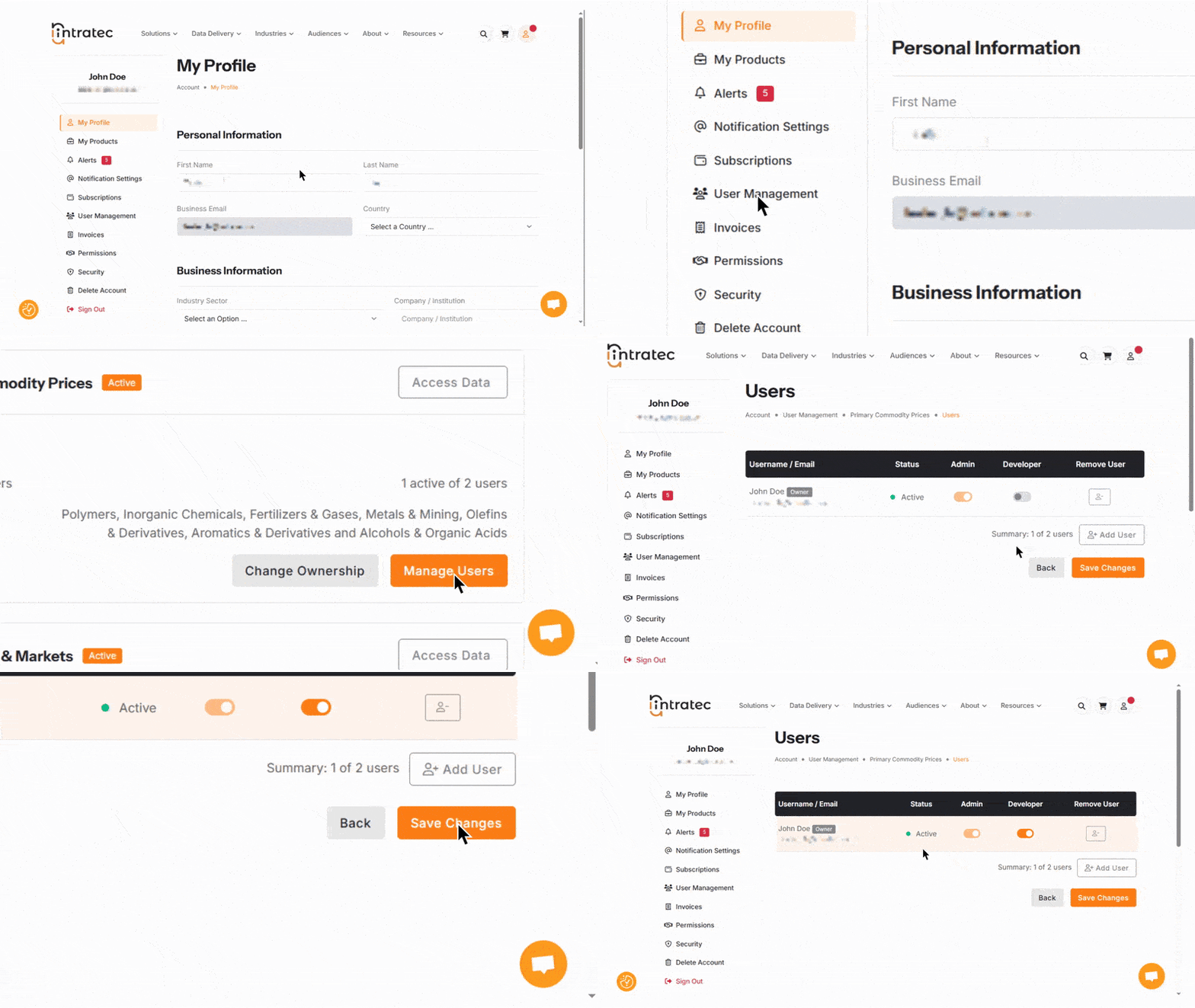
Only one developer is allowed per subscription. Using a shared corporate email for the developer role is recommended.
Intratec API and Workflow Orchestration Tools Compatibility
The Intratec API is highly compatible with popular workflow orchestration tools, including:
- Microsoft Logic Apps
- N8N
- Zapier
How much does the Intratec API cost?
The Intratec API is free for Advanced Plan subscribers. There is no additional cost beyond the Advanced Plan subscription.
- Starter and Pro plan subscribers must upgrade to the Advanced Plan to access the API
- A monthly data request limit applies based on the subscription
Can I have support on the Intratec data integrations?
Contact Intratec support for any issues with data integrations. When reaching out, provide a detailed description of the issue you are experiencing.
Available resources:
- PDF documentation
- Developer portal
- Excel Add-In video tutorials
- Power BI video tutorials
How easy is it to integrate Intratec APIs into my system?
The Intratec API follows consistent standards that developers are already familiar with, making it straightforward to set up and integrate. It is a standard REST API that returns JSON responses.
Compatible programming languages:
- JavaScript
- Python
- Ruby
- C#
- PHP
- Go
- R
Additional compatibility:
- Power BI "Get Data > Web" connector
- GitHub examples available for reference
- Common workflow and internal automation systems can consume the API without requiring proprietary tooling
How customizable are the API requests?
Currency and unit selection is available for the following products:
- Primary Commodity Prices
- Energy Price References
- Industry Economics Worldwide (IEW) Utilities
Currency and unit selection is not available for:
- Plant Construction Cost Indexes
- Plant Location Factors
Note: Date selection is not available for API requests.
How should I use the Intratec APIs to retrieve data?
- Generate a token to authenticate your requests
- Use the Series Info endpoint to discover available data series
- Request data via the Series Values or Series History endpoints (up to 40 series per request)
- Process the data in your application or workflow
What data can I access through the APIs?
The API provides access to the same data available through the online charts. You can check the available data series under your subscription to see what is accessible.
When are the APIs down for maintenance?
Scheduled maintenance occurs on the following days each month:
- 15th of the month
- 25th of the month
- Release day for each product
Maintenance hours: 6:00 AM to 10:00 PM US Central Time